
01 / Project Overview
n8n · Conversational Automation · Booking
AI Booking Chatbot & Payment Verification
An n8n-powered conversational booking system that answers customer questions, collects booking details, handles payment-proof approval, updates operational records, creates calendar events, and sends the final booking confirmation back through Telegram.
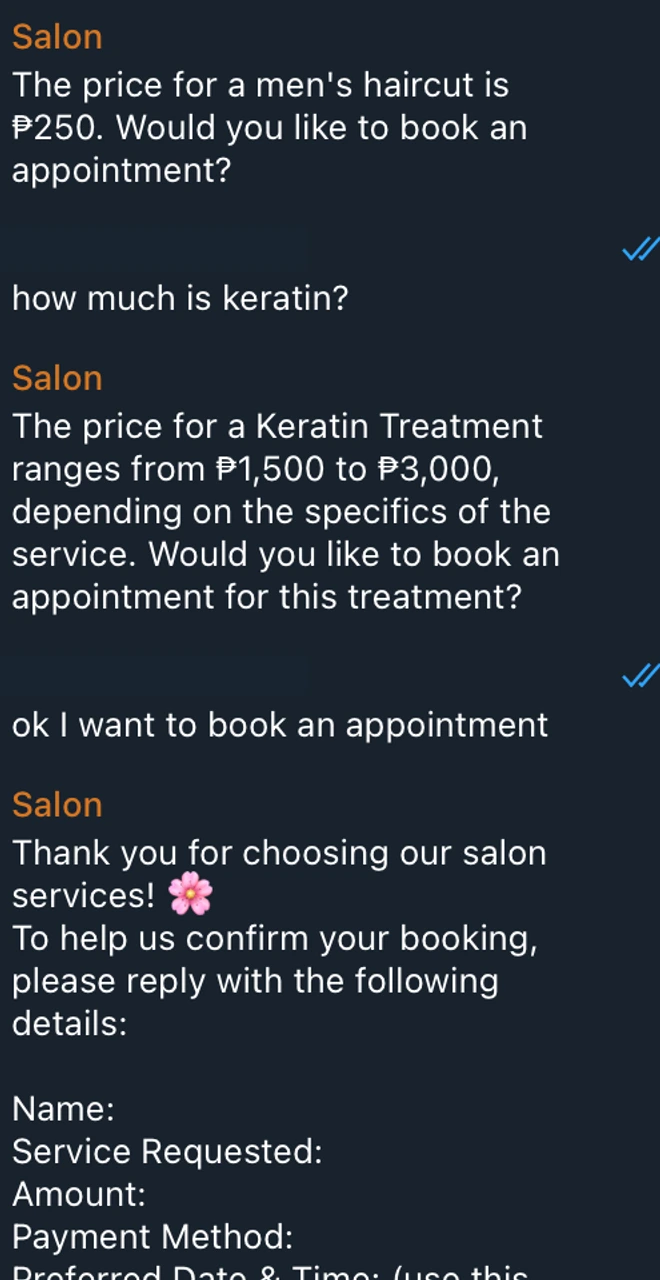
Pricing answers followed by structured booking-detail collection.
02 / Problem & Goal
A booking conversation becomes operational only when the systems behind it stay connected.
A customer can ask a question, request an appointment, send booking details, and submit payment proof in the same conversation.
The harder part is coordinating what happens behind that chat.
The workflow needs to understand the customer's intent, answer service questions accurately, collect the required booking information, maintain an operational booking record, handle payment proof, wait for approval, create the confirmed calendar event, and return the final booking details to the customer.
Without orchestration, those steps become separate manual handoffs between chat, files, records, payment review, and the calendar.
The goal of this system is to connect those steps into one workflow while keeping payment confirmation as a deliberate human checkpoint.
Automate the handoffs. Keep payment approval human.

Customer, service, date/time, payment, receipt, and booking-status fields. Private row data is redacted.
03 / System / Workflow
One conversation, multiple operational paths
The workflow begins with Telegram, then uses AI-assisted routing to decide what the customer is trying to do.
A general service question should not run the same path as a booking request or payment-proof submission.
The system separates those intents, then coordinates the appropriate records, files, approval steps, and calendar actions.
Telegram message AI intent routing
Customer inquiry path
- Customer inquiry
- Knowledge retrieval
- Salon FAQ / pricing knowledge
- Response to customer
Booking path
- 01
Booking intent
Collect customer details
- 02
Google Sheets booking record
Request payment proof
- 03
Customer sends payment proof
Google Drive file handling
- 04
Owner receives proof in Telegram
Human approval
Human approval checkpoint
Owner verifies the payment proof
The workflow waits for the owner to confirm or decline.
Owner confirms
- Create Google Calendar event
- Update booking record
- Send booking confirmation
- Customer receives scheduled date/time
Owner declines
- Do not finalize booking
- Notify customer of payment issue
- Ask customer to send new payment proof
04 / Inside the Build
The chatbot is only the front door
The customer sees a Telegram conversation, but the workflow behind it coordinates intent routing, retrieval, operational records, file handling, payment approval, scheduling, and final confirmation.
The conversation changes path based on intent
An incoming Telegram message first passes through AI-assisted routing so the workflow can distinguish between a customer inquiry, booking-related details, and other supported actions.
That separation prevents every message from triggering the same automation path.
A customer asking about salon pricing can receive an answer, while a customer expressing booking intent can move into structured detail collection.
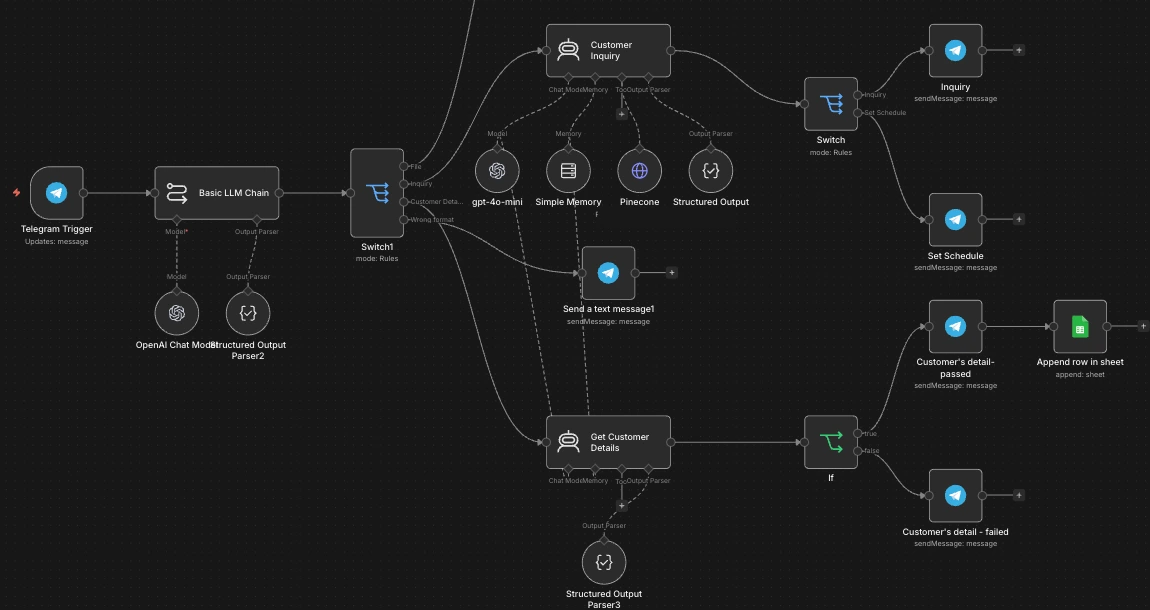
Telegram entry, intent separation, inquiry responses, and detail collection. Excerpt of the complete workflow.
Service answers are grounded in salon information
The customer-inquiry branch is backed by salon FAQ and pricing information rather than relying only on a generic model response.
The workflow connects the conversational assistant to a retrieval layer so questions about services, prices, operating information, and related salon details can be answered from the supplied knowledge source.
Knowledge source → Retrieval layer → Conversational answer
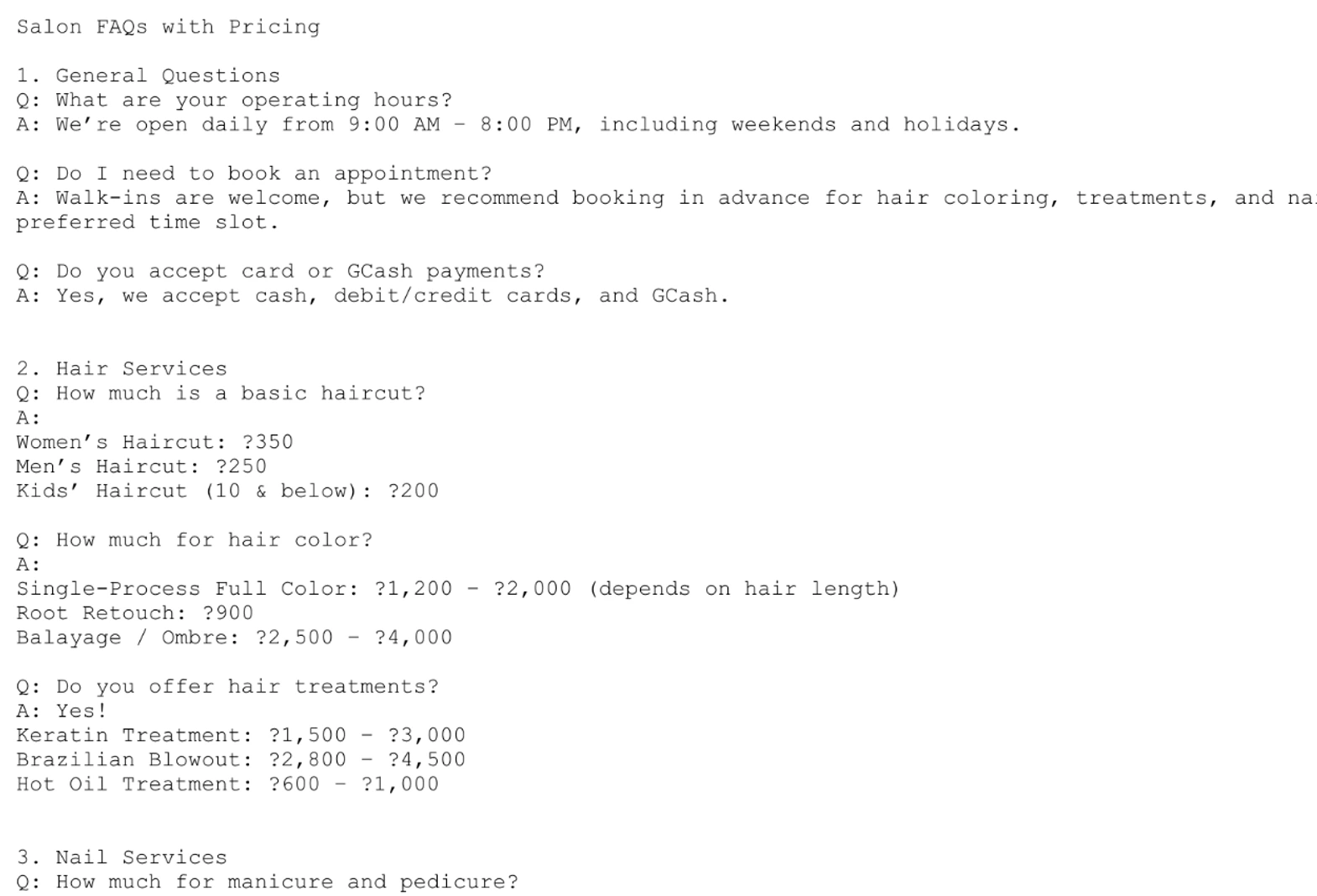
Salon FAQ and pricing information used to ground customer answers.
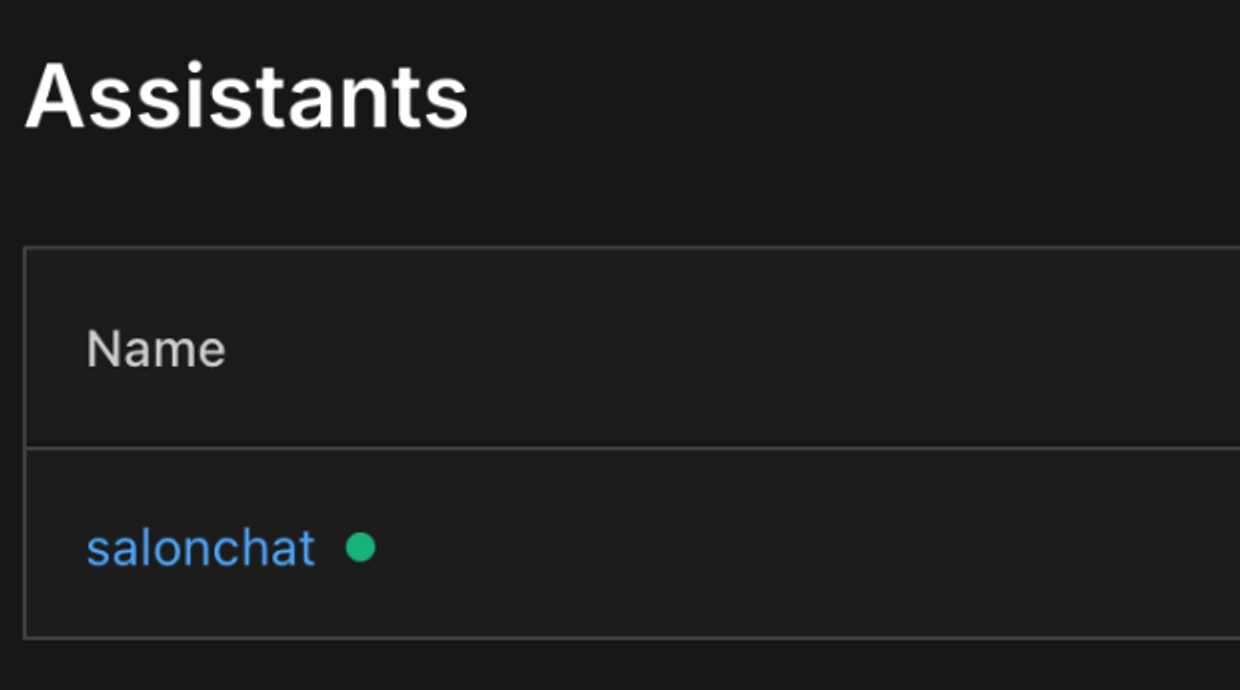
Pinecone-backed assistant used by the inquiry branch.
The conversation produces operational data
The booking workflow does more than generate chat responses.
Customer and booking information is written into a structured Google Sheets record so later workflow stages can retrieve and update the same booking as payment and scheduling progress.
The record supports fields for service, requested date/time, payment information, receipt reference, booking status, and booking identification.
Google Sheets booking record → Payment progress → Confirmed schedule
Payment approval is a human checkpoint
When the customer sends payment proof, the workflow handles the file and sends the payment screenshot to the owner through Telegram.
The workflow then waits for the owner's decision.
If the owner confirms the payment, the booking is allowed to continue.
If the owner declines it, the booking is not finalized and the customer is asked to submit another payment proof.
The approval decision is intentionally human rather than delegated to AI.

File handling, owner approval request, and decision branches. Excerpt of the complete workflow.
Approval turns the request into a scheduled booking
Once payment is confirmed, the workflow creates the booking in Google Calendar, updates the booking record, and sends the customer a Telegram confirmation containing the approved schedule information.
This keeps the conversational experience connected to the actual operational calendar instead of ending with a message that still requires manual scheduling.
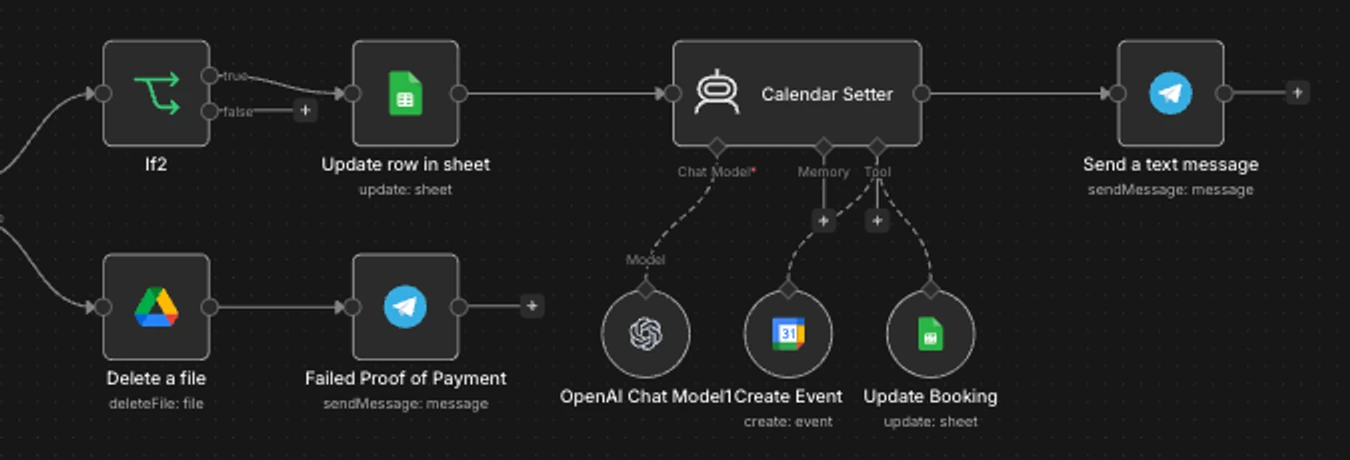
Approved scheduling, booking-record updates, and customer confirmation. Excerpt of the complete workflow.
05 / Key Decisions & Challenges
Automation works better when every decision is not treated the same.
Intent routing before action
Not every message represents the same business event.
The workflow first interprets the incoming message so customer inquiries, booking details, and payment-related actions can follow different paths.
This keeps the automation from treating a pricing question like a booking request.
Grounding customer answers
The inquiry assistant is connected to a salon FAQ and pricing knowledge source through the retrieval layer.
That allows the workflow to answer supported questions from known business information instead of relying only on general model knowledge.
Keep the booking record synchronized
The chat interaction is connected to an operational booking record.
As the process changes from details collection to payment review and then to confirmed scheduling, the workflow can retrieve and update the corresponding booking information rather than creating disconnected data at each step.
Human-in-the-loop payment approval
Payment confirmation is deliberately not left to the AI workflow.
The owner receives the submitted proof through Telegram and explicitly confirms or declines it.
Only an approved payment can proceed to final calendar scheduling.
This creates a clear approval gate around a financially sensitive step.
Separate success and failure paths
A declined payment does not continue through the successful booking path.
Instead, the customer receives a payment-confirmation issue message and is asked to send another proof.
The workflow therefore handles both the ideal booking journey and an important exception path.
System handles
- intent routing
- customer-question responses
- booking-detail collection
- booking-record creation and updates
- payment-proof file handling
- owner approval request
- calendar-event creation after approval
- customer confirmation
- retry messaging after declined payment
Owner handles
The owner verifies the payment proof and makes the approve / decline decision.
- payment-proof verification
- approval or rejection of the payment
Automation coordinates the process. The human approves the financial checkpoint.
06 / Outcome & Takeaways
What the system enables
Operational outcome
The workflow connects customer conversation, knowledge retrieval, booking details, payment-proof handling, human approval, operational records, calendar scheduling, and customer confirmation inside one coordinated process.
Instead of manually moving between Telegram, booking records, files, and the calendar after every customer message, the workflow carries the process forward based on the current state of the booking.
The result is a defined booking workflow in which automation handles routing and coordination while the payment decision remains under human control.
Key takeaway
A useful chatbot needs to control workflow state, not just generate replies.
The important part of this build is not only the conversational interface.
The chatbot becomes operationally useful because each conversation can connect to records, files, approval decisions, scheduling, and follow-up actions.
The system also demonstrates that AI does not need to own every decision. Sensitive steps such as payment approval can remain human while automation manages the surrounding process.
Technology
- n8n
- Telegram
- AI / LLM-assisted routing
- Google Sheets
- Google Drive
- Google Calendar
- Pinecone