
01 / Project Overview
Airtable · n8n · Operations Automation
Purchasing & Order Operations Automation Hub
An operations system that moves product opportunities into Airtable, routes approved items into a purchasing queue, then uses n8n to classify supplier emails and keep purchased-order records updated as orders are confirmed, shipped, delivered, or cancelled.
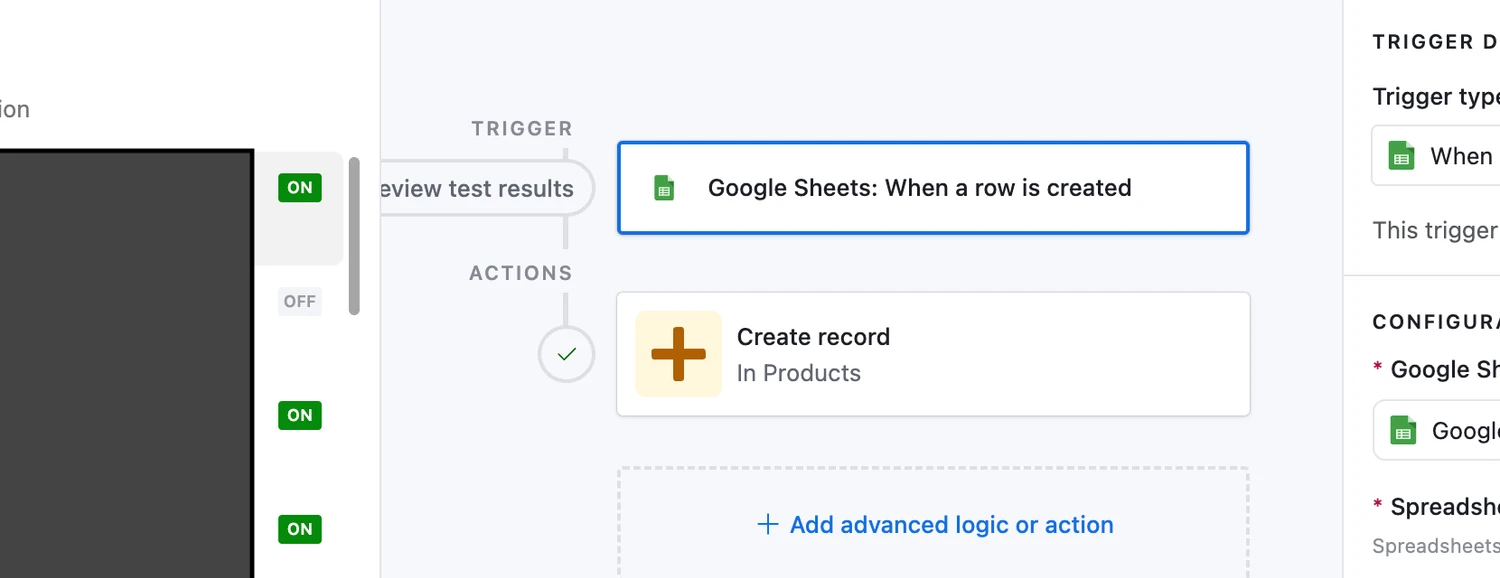
Google Sheets row created → Create record in Airtable Products.
02 / Problem & Goal
The challenge is not only finding a product. It is keeping the purchasing process organized after approval.
Product opportunities can begin in one source, move through approval, become purchases, and then generate a stream of supplier emails as orders progress.
Without a defined system, those handoffs can become fragmented.
A product may be approved but not moved into a purchasing queue. A supplier may send a shipping or delivery update that still needs to be found, interpreted, and reflected in the operational record. A cancellation can arrive by email but remain disconnected from the order tracker.
The goal of this system is to connect those stages into one operating flow.
Product opportunities enter Airtable, approved items move into a dedicated Ready for Purchase queue, and supplier emails are later classified so the corresponding purchased-order record can be updated with the latest order status.
Move the work forward when the business state changes.
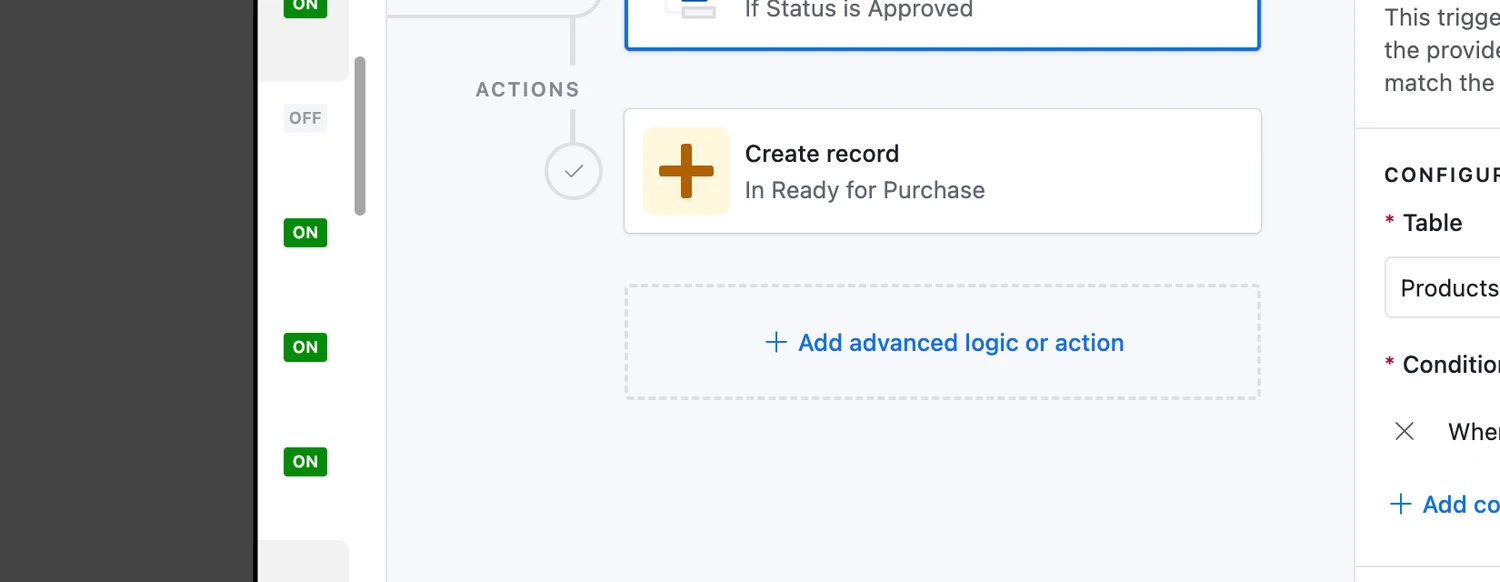
When Status = Approved, Airtable creates the corresponding record in the separate Ready for Purchase table.
03 / System / Workflow
One operations flow from product intake to order delivery
The system connects three different types of work: product intake, approval and purchasing handoff, and supplier-email monitoring after purchase.
Each stage updates the operational state rather than relying on someone to recreate the same information manually in another place.
Operational state moves forward through Airtable. Supplier email updates enter only after a purchase exists.
- 01
Google Sheets product lead
A new product opportunity enters the system.
- 02
Airtable Products
Structured product record.
- 03
Status = Approved
Approval becomes actionable.
- 04
Ready for Purchase
Separate purchasing queue.
- 05
Purchased / order record
Purchase process remains intentionally high level.
- 06
Supplier email
The update source after purchase.
- 07
n8n classification
Identify a supported order update.
- 08
Airtable order update
Write the matched order state.
Supplier email update routes
Confirmed
Organize purchase-order email handling and keep the order identified for tracking.
Shipped
Find the matching Airtable order and update tracking or shipping information.
Delivered
Find the matching Airtable order and update delivery date or delivered state.
Cancelled
Find the matching Airtable order and mark the order cancelled.
Fallback
Unsupported or unrelated message. Do not update the order record.
04 / Inside the Build
Airtable holds the operating state. Automations move it forward.
The system combines Airtable's structured operational records with n8n's ability to interpret and route incoming supplier updates.
New product opportunities become structured records
A new row in the source Google Sheet triggers an Airtable automation that creates a corresponding record in the Products table.
This gives the product opportunity a structured place inside the operations system rather than leaving it isolated in the sourcing sheet.
A new source row creates the corresponding Products record.
Approval is a handoff, not just a label
When the product status changes to Approved, Airtable creates a record in the separate Ready for Purchase table.
That turns approval into an operational handoff.
The purchasing team or process can work from a defined queue instead of manually copying approved products into another tracker.
Approval creates the record in the purchasing queue.
Supplier emails are interpreted before they update the order tracker
After a purchase is made, supplier emails become one of the main sources of order-state changes.
The n8n workflow reads incoming Gmail messages, classifies the type of purchase-order update, extracts the relevant order information, and routes the message to the correct handling path.
The workflow distinguishes between confirmation, shipment, delivery, cancellation, and unsupported messages.
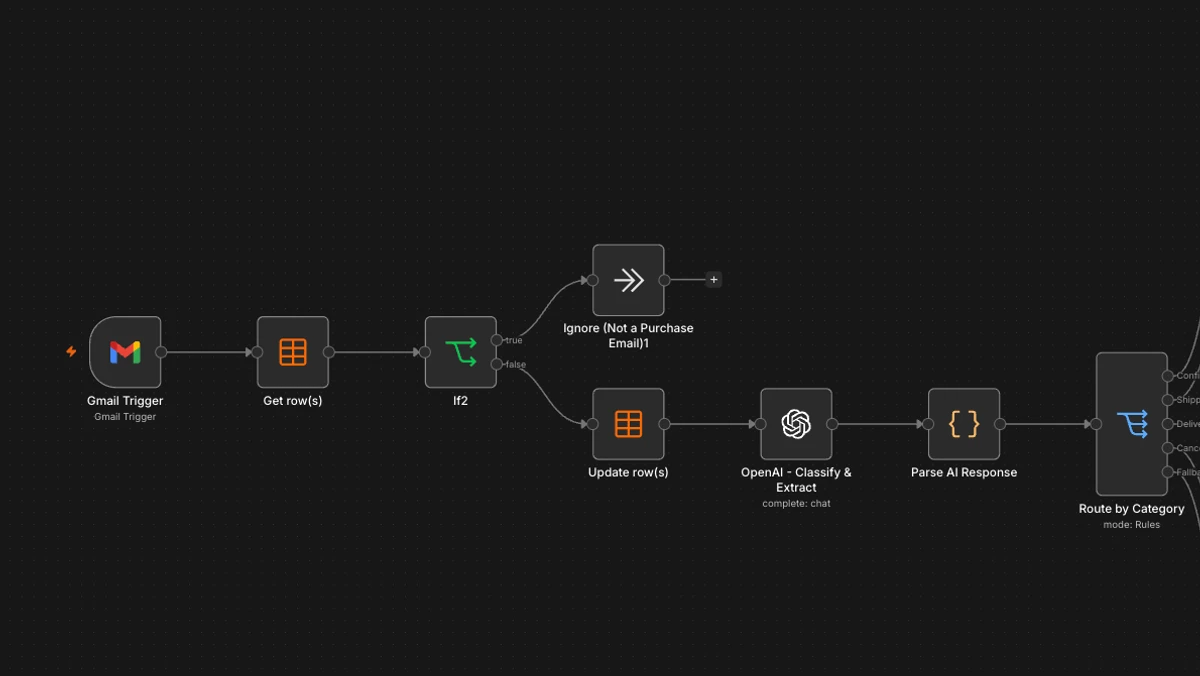
Gmail entry, AI-assisted classification and extraction, and routing by update type.
The email is useful only when it updates the right order
For supported order updates, the workflow finds the corresponding Airtable order before writing the new operational state.
Shipping messages can add tracking information. Delivery messages can record the delivery date or delivered state. Cancellation messages can mark the order as cancelled.
This keeps the order tracker synchronized with supplier communications instead of treating email as a separate source that must be checked manually.
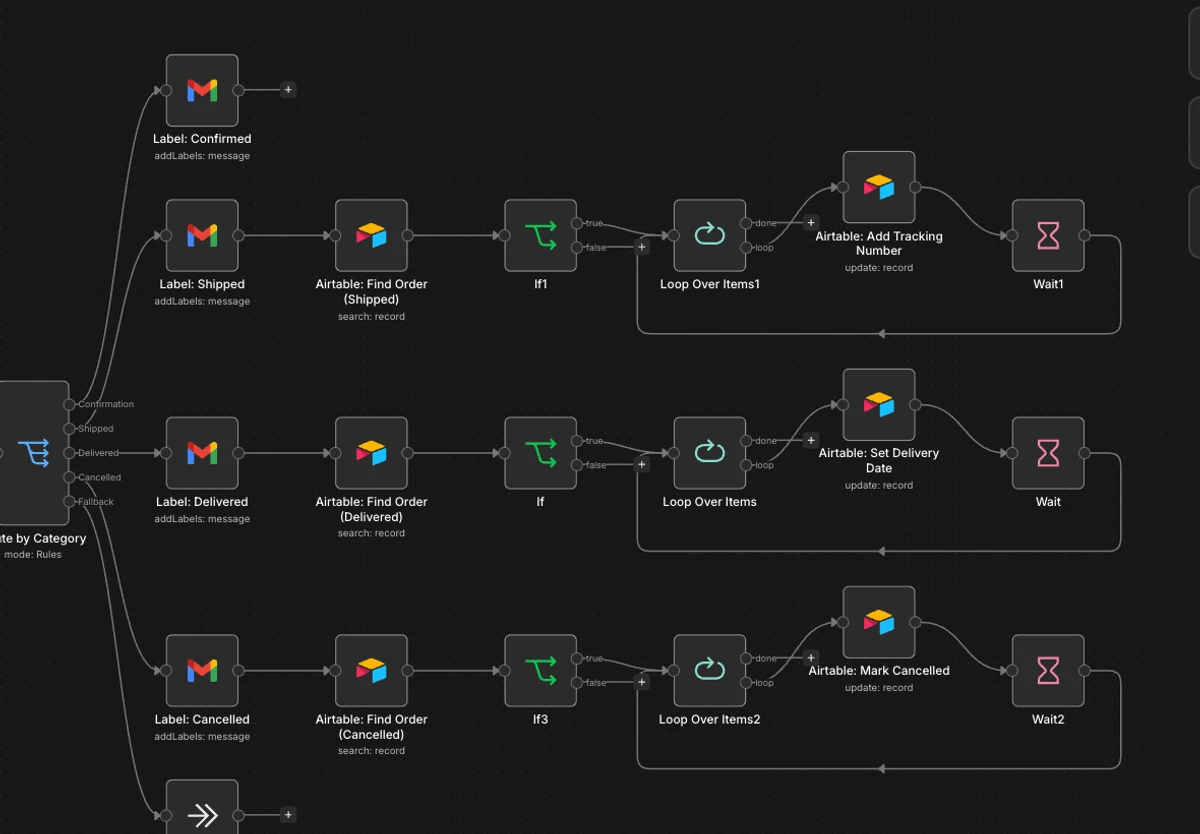
Matching the Airtable order before shipment, delivery, cancellation, or fallback handling.
The workflow was built to run repeatedly, not as a one-off transformation
The execution view provides supporting proof that the purchase-order email workflow is published and has been run multiple times successfully.
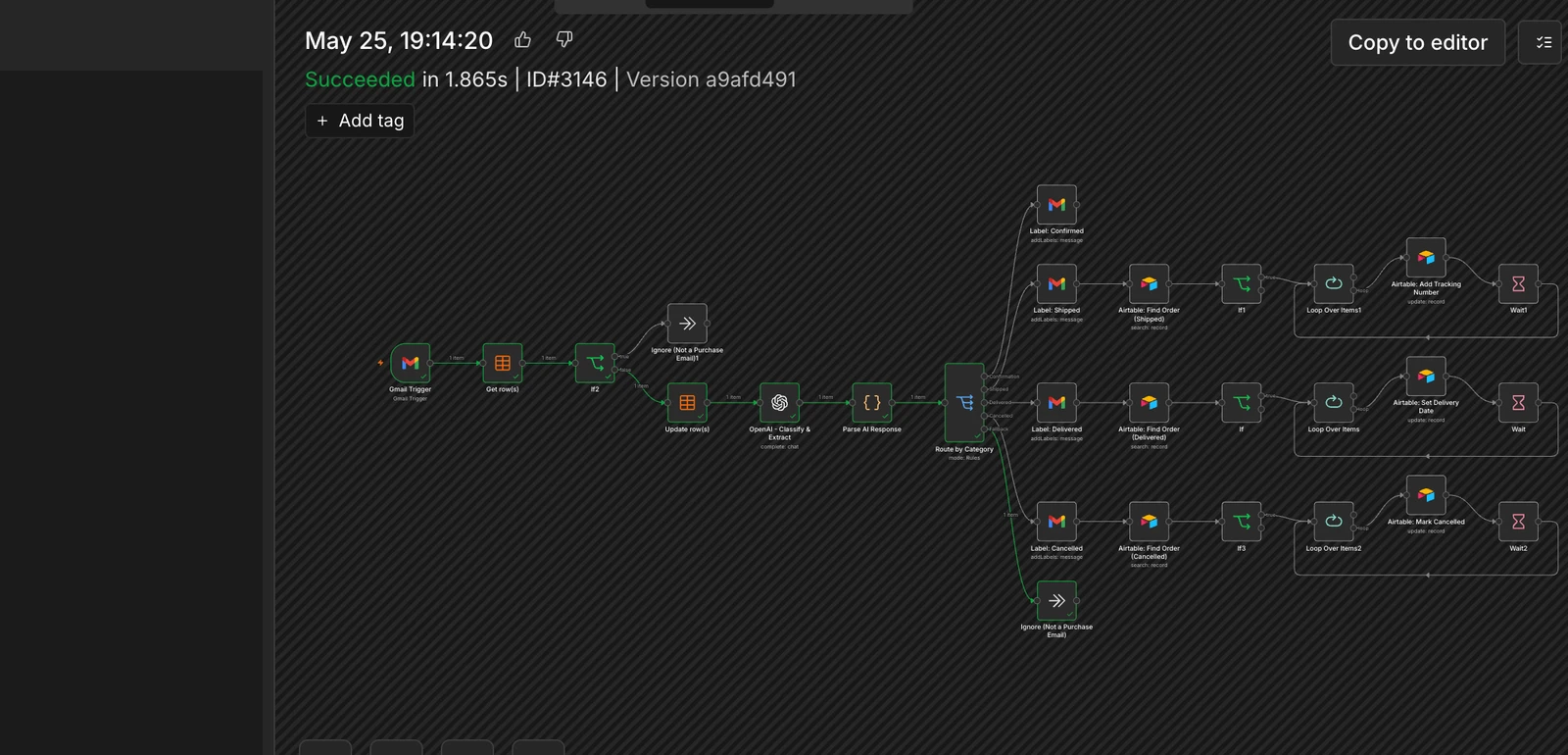
Supporting execution proof, without making a volume or performance claim.
05 / Key Decisions & Challenges
The system is organized around handoffs, not around individual tools.
Approval should create the next operational state
Changing a product to Approved is not useful if someone still needs to manually move it into the purchasing workflow.
The Airtable automation makes the approval state actionable by creating the corresponding record in Ready for Purchase.
Keep sourcing and purchasing connected without treating them as the same step
The Products table and Ready for Purchase table represent different operational states.
A product can exist as an opportunity before it is approved. The purchasing queue should contain only records that have passed the approval checkpoint.
Supplier monitoring is email-driven
The system monitors updates for orders that have already been purchased by interpreting incoming supplier emails.
The email is the update source. Airtable remains the operational record.
Classify before updating data
The workflow first determines whether a message is a supported purchase-order update and which state it represents.
Only then does the appropriate branch look up and update the Airtable order.
Match the update to the correct record
The workflow must identify the relevant order before writing tracking, delivery, or cancellation information.
This prevents the automation from treating all supplier emails as global status changes.
Handle exception paths explicitly
Unsupported or unrelated messages fall through the fallback path rather than forcing an Airtable update.
This keeps exception handling part of the design rather than treating it as an afterthought.
System handles
- product-lead intake into Airtable
- approved-record handoff
- supplier-email intake
- update classification
- supported data extraction
- matching update to order
- tracking updates
- delivery updates
- cancellation updates
- fallback routing
Human / operations handles
Business judgment stays with the operator.
- evaluating product opportunities
- approving products
- completing the actual purchase
- handling exceptions requiring judgment
- reviewing operational records when needed
Automate the state change. Keep business judgment with the operator.
06 / Outcome & Takeaways
What the system enables
Operational outcome
The system creates a connected operating flow from product intake through purchasing and post-purchase order monitoring.
Product opportunities enter Airtable as structured records. Approval moves the work into a defined purchasing queue. After the purchase is made, supplier emails can update the corresponding order as it is confirmed, shipped, delivered, or cancelled.
Instead of treating the sourcing sheet, Airtable tables, and supplier inbox as separate systems that must be reconciled manually, the automations connect them around the current state of the order.
Key takeaway
Operational automation works best when each table represents a real stage of work.
The important part of this build is not simply moving records between Airtable tables or parsing emails.
The system works because each automation corresponds to a meaningful business transition.
A product becomes approved before it enters the purchasing queue. A purchased order receives a shipping update only when a supplier email is classified as a shipment. A delivery or cancellation changes the order state only when that event is actually represented in the incoming message.
Designing around those states makes the automation easier to understand, maintain, and extend.
Technology
- Airtable
- n8n
- Gmail
- Google Sheets
- AI / LLM-assisted email classification and extraction